Zero-Shot Prompting
Estimated reading time: 15 minutes
📋 Table of Contents
- Why Zero-Shot Works (The Science Behind It)
- Practical Examples That Work
- When Zero-Shot is Your Best Choice
- Best Practices from 20 Years
- Mistakes That Kill Your Results
- Advanced Zero-Shot Techniques
💡 Key Insight: Modern AI models like GPT-4, Claude, and Gemini have been trained on billions of examples. They already "know" how to translate, summarize, classify, and create — you just need to ask clearly!
Why Zero-Shot Actually Works
Think of AI models as graduates with PhDs in nearly everything. During training, they've seen:
- Billions of conversations in every language
- Millions of code examples across all programming languages
- Countless documents on every topic imaginable
- Endless patterns of classification, analysis, and reasoning
So when you ask them to "translate this" or "summarize that," they're not learning from scratch — they're applying patterns they've seen thousands of times before.
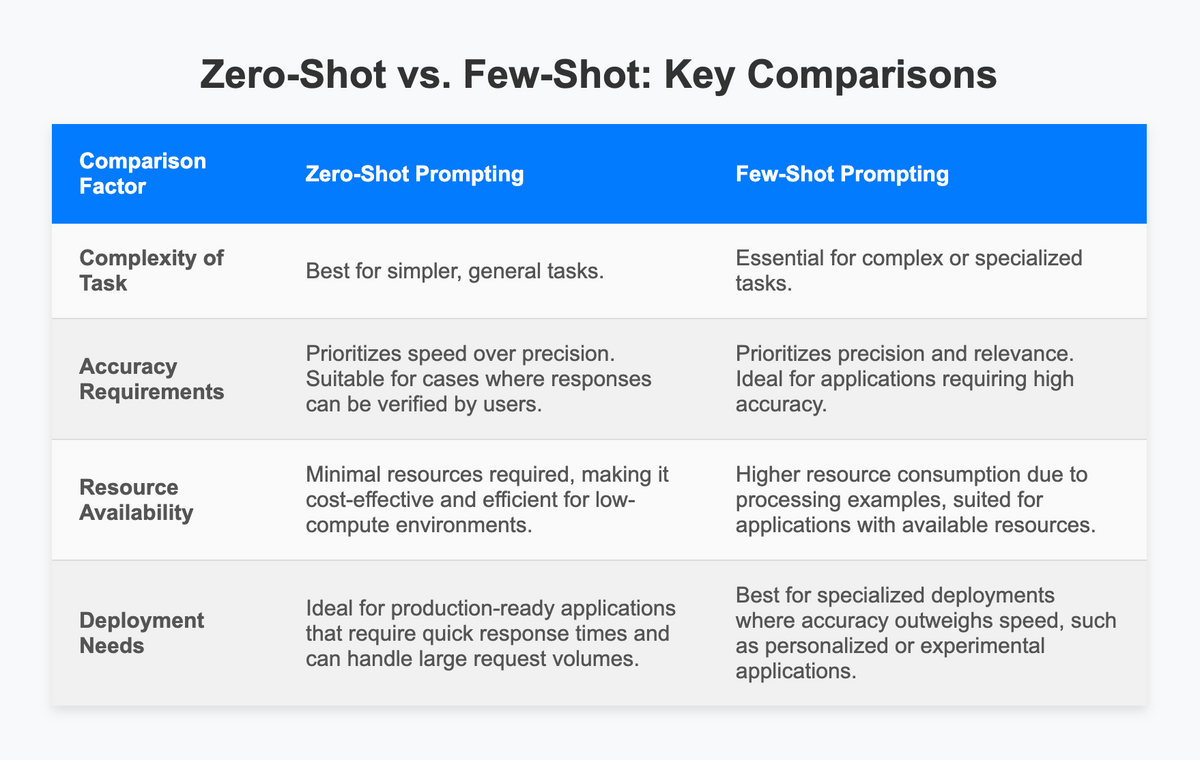
Visual comparison: Zero-shot needs no examples, while few-shot requires demonstrations
🎯 The Zero-Shot Advantage: Save time, save tokens, and get instant results for 80% of your daily AI tasks. When it works, nothing beats its simplicity.
Practical Examples That Actually Work
Let me show you real-world zero-shot prompts that deliver results:
Example 1: Translation (Super Simple)
Prompt:
"Translate this to Spanish: 'Hello, how are you today?'"
→ Output:
"Hola, ¿cómo estás hoy?"
Example 2: Sentiment Analysis
Prompt:
"Classify the sentiment as Positive, Negative, or Neutral: 'This movie was absolutely fantastic!'"
→ Output:
Positive
Real example of zero-shot prompting in action
Example 3: Smart Summarization
Prompt:
"Summarize this article in exactly 2 sentences: [long article about AI advancements...]"
→ Output:
Two concise, well-crafted sentences that capture the essence
\
Example 4: Direct Question Answering
Prompt:
"What is the capital of Japan?"
→ Output:
Tokyo
Example 5: Creative Writing
Prompt:
"Write a haiku about the ocean."
→ Output:
Waves crash on the shore
Salt mist dances in the wind
Peace finds me at last
🎯 When Zero-Shot is Your Best Choice
Use Zero-Shot When:
- The task is straightforward and common (translation, basic Q&A, simple classification)
- You want quick results with minimal prompt engineering effort
- Token limits matter — every character costs money in API calls
- You're exploring or prototyping to see what AI can do
- The output format is flexible and doesn't need exact structure
Consider Few-Shot Instead When:
- You need very specific formatting (JSON structure, specific templates)
- The task is highly specialized or domain-specific
- Accuracy must be extremely high for business-critical operations
- The AI keeps misunderstanding your instructions
🏆 Best Practices
1. Be Crystal Clear and Specific
|
❌ Vague Prompt: "Tell me about dogs" |
✅ Better Prompt: "Explain the key behavioral differences between Labrador Retrievers and Golden Retrievers in 3 bullet points" |
Specificity = Better results. Always.
2. Specify Your Output Format
✓ "Answer in bullet points"
✓ "Respond as JSON with 'name' and 'age' fields"
✓ "Keep it under 50 words"
✓ "Format as a table with columns: Name, Price, Rating"
AI loves clear formatting instructions!
3. Use Role-Playing for Better Context
"You are an expert translator specializing in medical terminology. Translate this diagnosis report from English to French..."
Giving the AI a role helps it understand the expertise level and tone you need.
4. Add Clear Constraints
✓ "Keep it under 100 words"
✓ "Use simple language suitable for 10-year-olds"
✓ "Exclude any technical jargon"
✓ "Focus only on benefits, not features"
Constraints shape the output to exactly what you need.
🚫 Common Mistakes That Kill Your Results
❌ Mistake #1: Being Too Vague
Saying "write something about climate" gives the AI zero direction. Be specific: "Write a 200-word explanation of how carbon emissions affect ocean temperatures, suitable for high school students."
❌ Mistake #2: Overcomplicating Simple Tasks
Don't write a paragraph-long prompt when "Translate to German: [text]" will work perfectly. Save complexity for complex tasks.
❌ Mistake #3: Forgetting Output Format
If you need structured data but don't specify format, the AI will give you paragraphs. Always mention: "Respond as a JSON array" or "Format as a numbered list."
❌ Mistake #4: Assuming AI Knows Your Context
The AI doesn't know you're a marketer, doctor, or student unless you tell it. Provide context: "I'm a small business owner looking to..."
Advanced Zero-Shot Techniques
Pro Tip #1: Chain Your Instructions
"First, analyze this customer review for sentiment. Then, extract key product features mentioned. Finally, rate the review helpfulness from 1-5."
Pro Tip #2: Use Negative Instructions
"Summarize this article. Do NOT include any opinions or interpretations, only factual statements."
Pro Tip #3: Leverage System Prompts
If your AI tool supports it, set a system prompt that defines global behavior: "You are a concise assistant who always responds in bullet points." This affects every subsequent query.
Comments
Post a Comment